
使用导航器跳转页面
本文档贡献者:sunnylqm(100.00%)
移动应用基本不会只由一个页面组成。管理多个页面的呈现、跳转的组件就是我们通常所说的导航器(navigator)。
本文档总结对比了 React Native 中现有的几个导航组件。如果你刚开始接触,那么直接选择React Navigation就好。 React Navigation provides an easy to use navigation solution, with the ability to present common stack navigation and tabbed navigation patterns on both iOS and Android. As this is a JavaScript implementation, it provides the greatest amount of configurability as well as flexibility when integrating with state management libraries such as redux.
如果你只针对 iOS 平台开发,想和系统原生外观一致,不需要什么自定义的设置,那么可以选择NavigatorIOS, as it provides a wrapper around the native UINavigationController class. This component will not work on Android, however.
If you'd like to achieve a native look and feel on both iOS and Android, or you're integrating React Native into an app that already manages navigation natively, the following libraries provide native navigation on both platforms: native-navigation, react-native-navigation.
React Navigation
社区今后主推的方案是一个单独的导航库react-navigation,它的使用十分简单。
首先是在你的应用中安装此库:
yarn add react-navigation
然后你就可以快速创建一个有两个页面(Main 和 Profile)的应用了:
import {
  StackNavigator,
} from 'react-navigation';

const App = StackNavigator({
  Home: { screen: HomeScreen },
  Profile: { screen: ProfileScreen },
});
其中每一个 screen 组件都可以单独设置导航选项,例如导航头的标题。还可以使用navigation属性中的方法去跳转到别的页面:
class HomeScreen extends React.Component {
  static navigationOptions = {
    title: 'Welcome',
  };
  render() {
    const { navigate } = this.props.navigation;
    return (
      <Button
        title="Go to Jane's profile"
        onPress={() =>
          navigate('Profile', { name: 'Jane' })
        }
      />
    );
  }
}
React Navigation 的路由写法使其非常容易扩展导航逻辑,或是整合到 redux 中。由于路由可以嵌套使用,因而开发者可以根据不同页面编写不同的导航逻辑,且彼此互不影响。
React Navigation 中的视图是原生组件,同时用到了运行在原生线程上的Animated动画库,因而性能表现十分流畅。此外其动画形式和手势都非常便于定制。
要想详细了解 React Navigation,可以阅读这一篇英文的入门文档。
NavigatorIOS
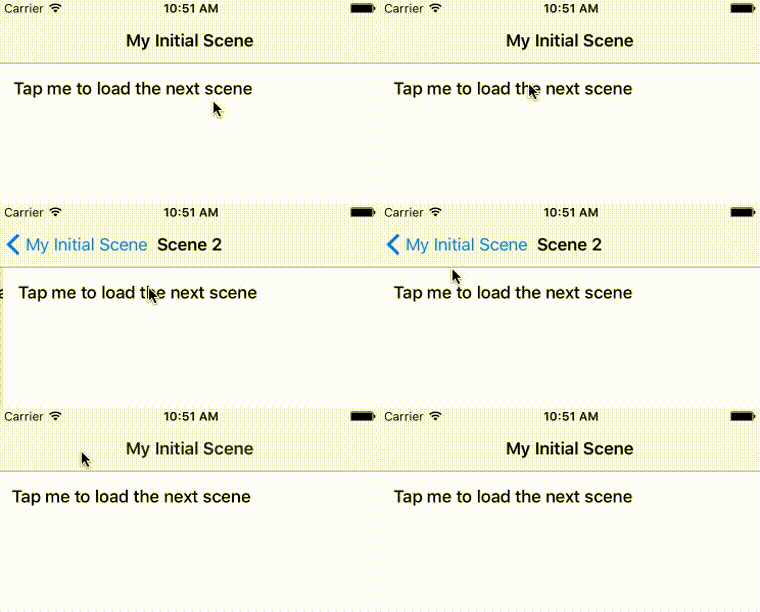
NavigatorIOS是基于 UINavigationController封装的,所以看起来很像。
<NavigatorIOS
  initialRoute={{
    component: MyScene,
    title: "My Initial Scene",
    passProps: { myProp: "foo" }
  }}
/>
和其他导航器类似,NavigatorIOS也使用路由对象来描述场景,但有一些重要区别。其中要渲染的组件在路由对象的component字段中指定,要给目标组件传递的参数则写在passProps中。被渲染的 component 都会自动接受到一个名为navigator的属性,你可以直接调用此对象(this.props.navigator)的push和pop方法。
由于NavigatorIOS使用的是原生的 UIKit 导航,所以它会自动渲染一个带有返回按钮和标题的导航栏。
import React from "react";
import PropTypes from "prop-types";
import { Button, NavigatorIOS, Text, View } from "react-native";

export default class NavigatorIOSApp extends React.Component {
  render() {
    return (
      <NavigatorIOS
        initialRoute={{
          component: MyScene,
          title: "My Initial Scene",
          passProps: { index: 1 }
        }}
        style={{ flex: 1 }}
      />
    );
  }
}

class MyScene extends React.Component {
  static propTypes = {
    route: PropTypes.shape({
      title: PropTypes.string.isRequired
    }),
    navigator: PropTypes.object.isRequired
  };

  constructor(props, context) {
    super(props, context);
    this._onForward = this._onForward.bind(this);
  }

  _onForward() {
    let nextIndex = ++this.props.index;
    this.props.navigator.push({
      component: MyScene,
      title: "Scene " + nextIndex,
      passProps: { index: nextIndex }
    });
  }

  render() {
    return (
      <View>
        <Text>Current Scene: {this.props.title}</Text>
        <Button
          onPress={this._onForward}
          title="Tap me to load the next scene"
        />
      </View>
    );
  }
}
点击这里阅读NavigatorIOS 的 API 文档。